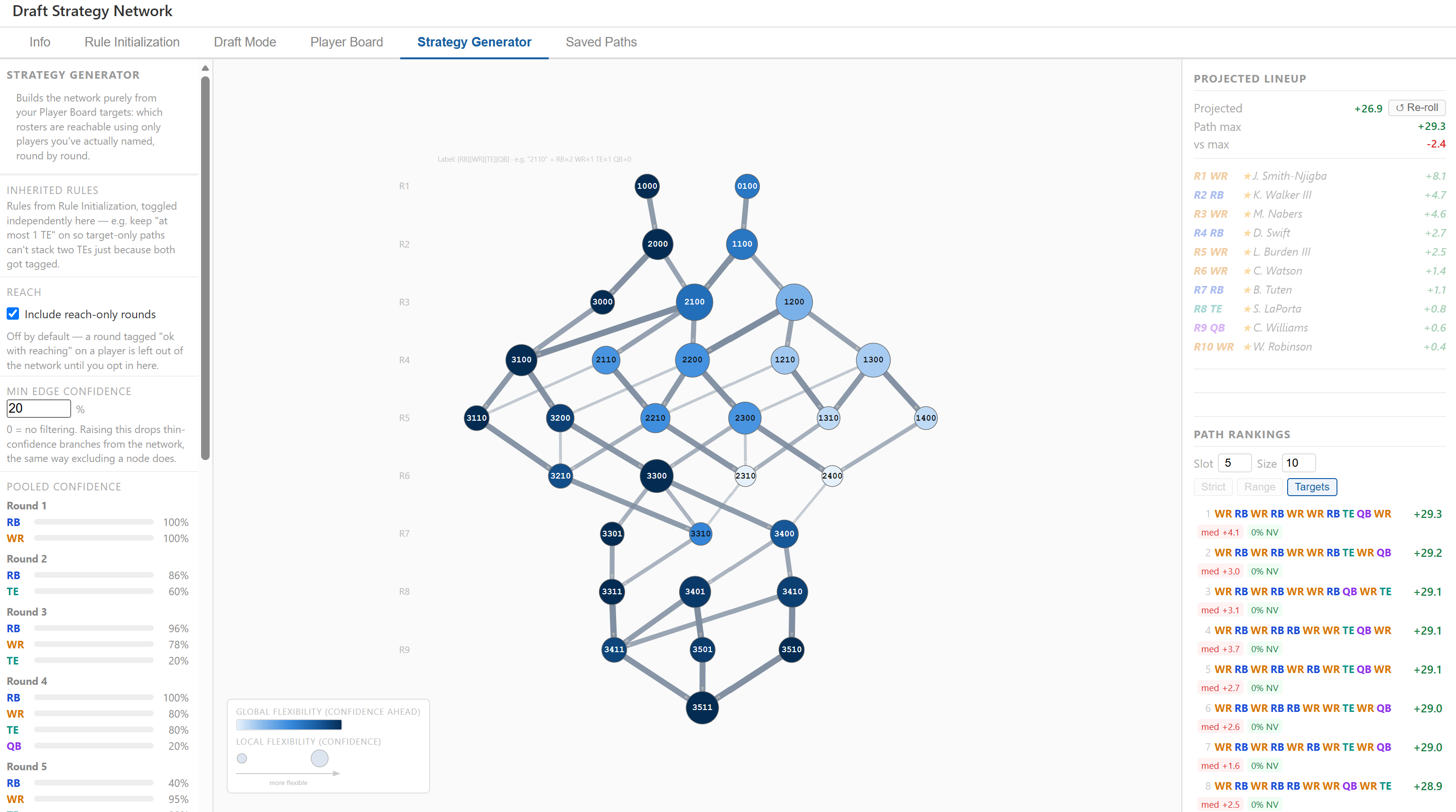
Builds the network purely from your Player Board targets: which rosters are reachable using only players you've actually named, round by round.
Inherited Rules
Rules from Rule Initialization, toggled independently here — e.g. keep "at most 1 TE" on so target-only paths can't stack two TEs just because both got tagged.
Reach
Off by default — a round tagged "ok with reaching" on a player is left out of the network until you opt in here.
Min Edge Confidence
%
0 = no filtering. Raising this drops thin-confidence branches from the network, the same way excluding a node does.
Pooled Confidence
Click an edge in the graph to exclude it
Excluded nodes
Excluded edges
Global flexibility
Local flexibility
Projected Lineup
Select a path from the rankings to see a projected lineup
Path Rankings
SlotSize
good luck−/+reaches
———
ADP–VAL–
Player ↑
Pos
Team
ADP
VAL
Bye
Status
Target Rounds
Network overlay
Draft Strategy Reference Guide
A complete guide to using the Fantasy Draft Network — workflow, concepts, measures, and customization options.
1
Set up your board
In Player Board, tag targets, mark avoids, and give each target one or more round + confidence entries. Your board drives edge values and availability estimates throughout the tool.
2
Shape the graph
Two ways in: Rule Initialization shapes the network from broad positional rules; the Strategy Generator builds it purely from your Player Board targets instead. Either one feeds Draft Mode.
3
Run mock drafts
In Draft Mode, pick positions round by round and watch the graph prune to what's still reachable. Browse ranked paths, undo picks, and explore branches freely.
4
Compare strategies
Save up to 20 promising paths in Saved Paths, then pick up to 5 of them for an in-depth side-by-side review — flexibility, value, sequence, round-by-round trend charts, and simulated outcomes.
Most draft prep is player-focused: rankings, tiers, ADP, targets. That work is essential — but it answers a different question than this tool does. Even with a perfect read on player value, you can still draft a fragile roster if your sequence of positions leaves you exposed. A round where you're forced into a thin position because of the picks you made two rounds earlier. A strategy that projects great value but requires three specific players to fall exactly to you. A plan that looks flexible in theory but converges to a single node by round 5, leaving no room to react when the board goes sideways. This tool makes that positional structure explicit — not as a replacement for rankings, but as a complement. Once you know which players you want, bring them here to stress-test the sequence: does your target list actually support the strategy, or are there hidden forced rounds and thin pools you haven't accounted for? The best drafters hold both layers at once — who they want and the structural logic that gets them there.
Fantasy drafts are sequential decisions under uncertainty. At each pick you choose a position (RB, WR, TE, QB), which narrows what future picks are feasible. The Draft Network models all feasible drafting sequences as a directed acyclic graph (DAG) so you can see every valid path from your first pick to your last before the draft starts.
Each node is a roster state — a snapshot of how many players at each position you have drafted so far. Each edge is a single draft pick (one position increment). A path from top to bottom is one complete draft strategy: e.g., RB → WR → RB → TE → WR → ...
Key insight: the graph is not about which players to pick — it is about which sequences of positions keep your options open. Once you add player value data, the graph tells you which sequence maximises value while surviving uncertainty.
Reading the graph
Nodes
Each node is labelled with its roster state, e.g. 2-1-0-0 means 2 RBs, 1 WR, 0 TEs, 0 QBs. Nodes are arranged in rows by draft round.
Color — always encodes global flexibility: the number of complete draft strategies reachable from that node, normalized within each round. Darker blue = more paths = more long-term optionality.
Size — encodes local flexibility: the number of distinct positions available at your very next pick. Larger = more immediate options. Unlike color, size is on a fixed scale — a given out-degree (or, once you've tagged targets, a given weighted Local Flexibility — see Measures Explained) always draws at the same radius regardless of round, so sizes are directly comparable anywhere in the graph.
Horizontal position within a round — within each row, nodes are ordered so that RB-heavy rosters sit on the left and WR-heavy rosters sit on the right. TE and QB picks are neutral and cluster near the center. As a result, edges drafted at RB angle left, edges drafted at WR angle right, and TE/QB edges aim roughly straight down. The overall shape of a strategy's path — leaning left vs. right — is visible at a glance without reading the labels.
Click a node to select it: everything that can reach it from round 1, and everything it can still reach through to the final round, stays lit up — the rest of the graph dims. Since the graph narrows into your click and widens back out on the far side, the lit region reads as an hourglass sitting on top of the selected node. It's a fast way to see a node's full context — where it came from, where it can still go — without tracing every edge by hand. Clicking additional nodes (without deselecting the first) narrows the highlight further, to only routes passing through all of them in round order; clicking a selected node again deselects just that one.
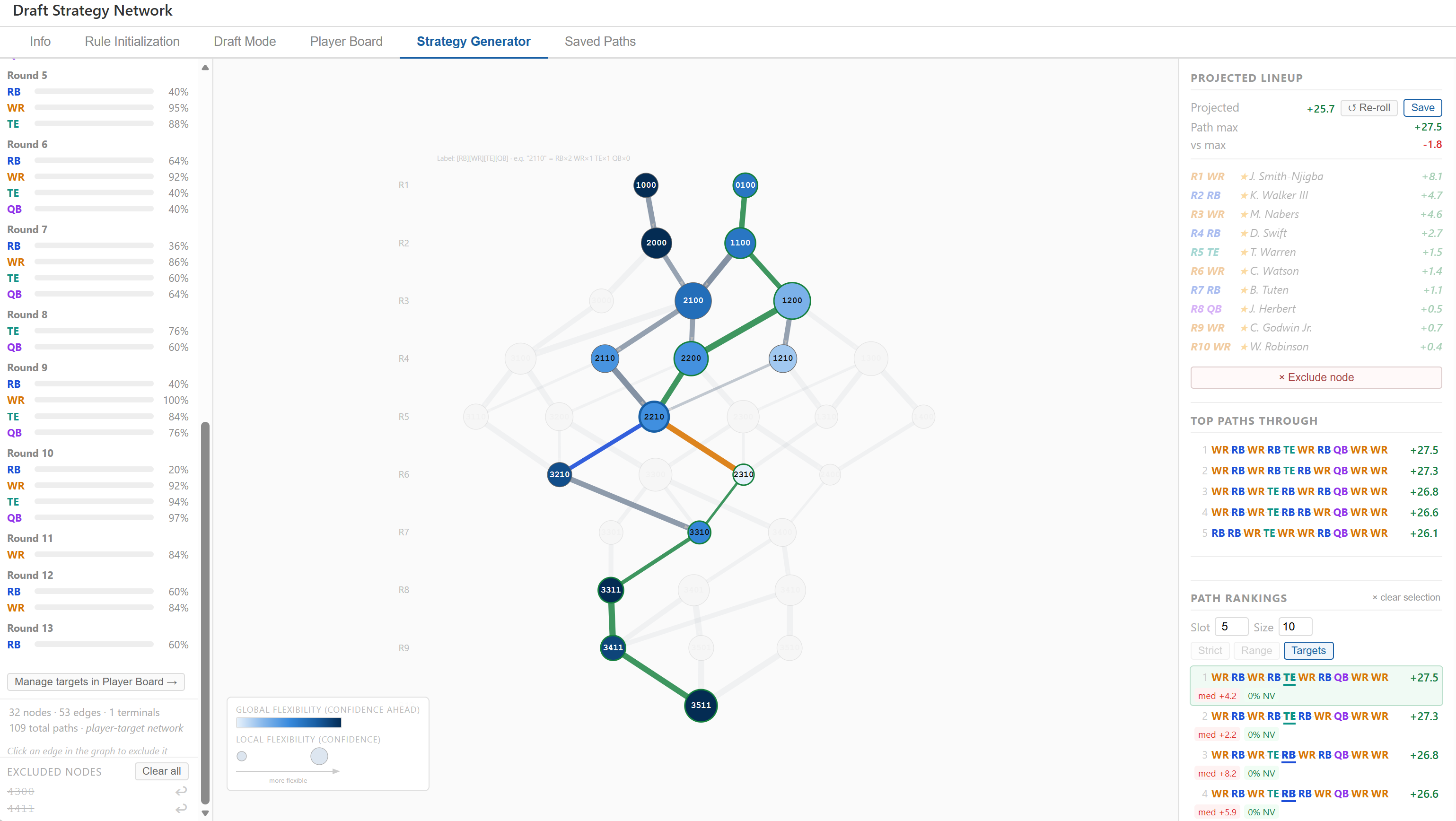
Node 2210 (2 RB, 2 WR, 1 TE by round 5) selected. Its whole hourglass is lit: both round-1 starts (1000 and 0100) and every node between them and 2210 stay bright, and downstream everything still reachable — through 3210, 2310, 3310, 3311, 3411 — stays bright too, all the way to 3511 at round 10. Everything off that hourglass (the entire right-hand branch through 1300/1400, for instance) fades out. The right panel switches from "Path Rankings" to "Top paths through" — the same ranked list, now scoped to only the complete strategies that actually pass through this one node. Click to open full-size.
The hourglass shape isn't always symmetric, and reading which half is narrow (or where exactly it pinches) is most of the value. Two contrasting examples, selecting different nodes on the same graph:
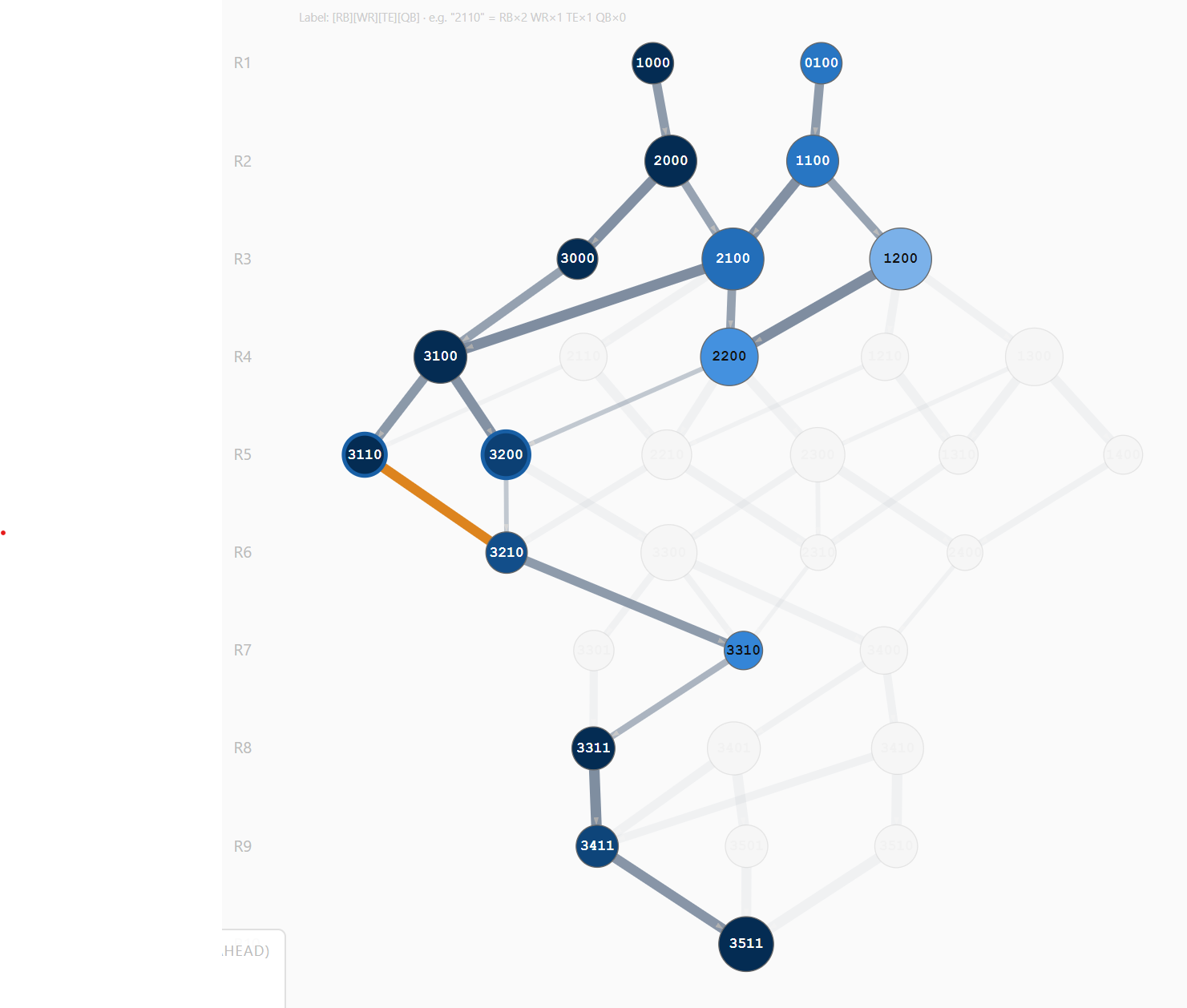
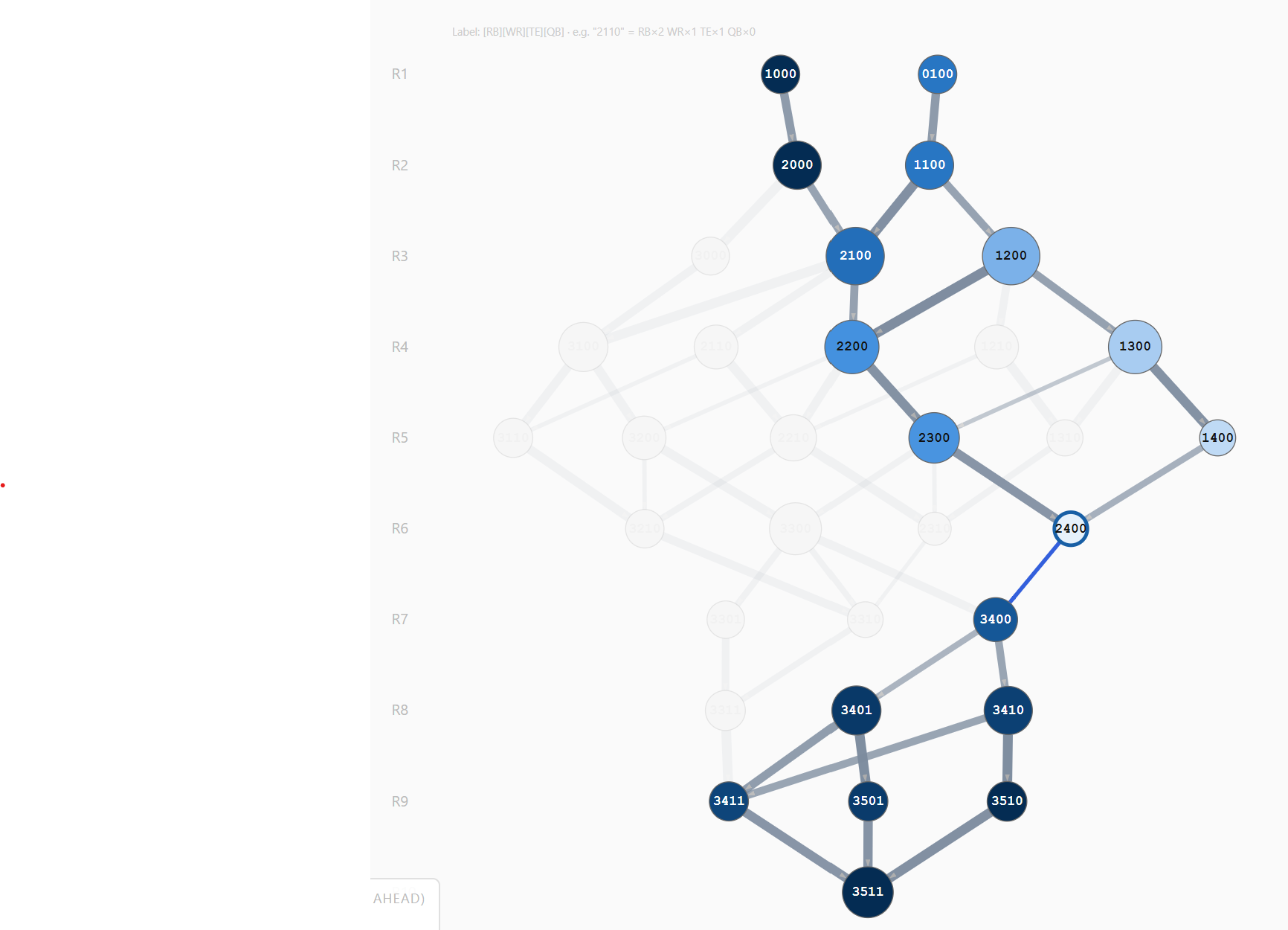
Easy to reach, nowhere to go once you're there. Node 3110 (3 RB, 1 WR, 1 TE by round 5) has two separate ancestor routes converging on it — 1000→2000→3000→3100→3110, and 1000→2000→2100→3100→3110 — so this roster shape is comfortably accessible. But downstream, 3110 has exactly one edge out, to 3210 — which has exactly one edge out, to 3310 — and so on, six straight forced rounds, all the way to 3511. Accessibility and downstream flexibility are different questions; this node answers them in opposite directions.Open on both sides, one pinch point in the middle. Node 2400 sits inside a hourglass that branches freely both before it (two round-1 starts, several routes through rounds 2–5) and after it (3401/3410 at round 8, then 3411/3501/3510 at round 9) — but 2400 itself has exactly one edge leaving it, to 3400, and it's one of the thinner, lower-confidence lines in the subgraph. A different failure mode from 3110: nothing structural forces the rest of this path, but the one pick behind that single edge has no fallback if it doesn't come through. Everything before and after that round was never the risk — this one round was.
You'll meet this same distinction again, formalized, in the Path Profile quadrants (Measures Explained → Confidence measures): 3110 is the "Locked-in" pattern strung across many rounds in a row; 2400 is a single "At risk" round sitting inside an otherwise "Decision point" path.
Edges
Edges point downward (round R → round R+1). In draft mode, edges on the highlighted path are colored by the position drafted:
Blue = RB | Amber = WR | Teal = TE | Purple = QB
Legend (bottom-left overlay)
The legend inside the graph area shows both flexibility measures on a single axis. The gradient bar corresponds to node color (global flexibility); the two circles show node size (local flexibility). The arrow points right toward "more flexible."
Tab-by-tab guide
Rule Initialization
This is where you sculpt the graph. Rules define which roster states are valid — the DAG only includes nodes that pass all active rules. Draft settings are also configured here.
Draft settings (top of the left panel):
Draft slot — your pick position within each round (1–12). Determines your exact pick numbers in a snake draft and which players are modeled as available at each edge.
League size — number of teams (default 12). Controls the gap between your picks each round.
Rounds — number of draft rounds to model. Each round adds one row of nodes and edges.
BPA mode — Best Player Available strategy. Strict: only players whose ADP ≥ your pick number are available. Range: expands the window on both sides. Targets: ignore ADP entirely and mock only off your Player Board round projections — a position's assumed pick is whichever of your named targets for that exact round has the best confidence/value, falling back to best-value-overall for a round with no named target. Locked to Targets (Strict/Range disabled) whenever the Strategy Generator's network is the active graph — that network only contains an edge because some player was named for that round, so any other BPA mode would show players unrelated to why the edge exists.
Range inputs — when BPA is Range, good luck −N includes players who fell up to N picks before your slot; +N reaches includes players you'd take up to N picks early.
Min edge confidence — 0% by default (no filtering). Any (round, position) edge whose pooled target confidence falls below this is removed from the graph, same as excluding it manually — including the cascade: whatever that edge's removal leaves unreachable is pruned too. Shares the same field in Rule Initialization and the Strategy Generator (setting one sets both), and applies to whichever graph is currently active. Raising it to 75%, for example, strips out every branch backed only by a shaky, low-confidence target, leaving just the routes you're genuinely confident in.
Rules control which roster states appear as nodes:
Add rules with the rule builder (position, comparator, value, scope).
Toggle a rule active/inactive without deleting it — the graph updates immediately.
Every rule also carries a separate toggle for the Strategy Generator (see that tab), so a rule can apply to one network without applying to the other.
Nodes excluded manually via the "Exclude node" button are tracked separately from rules and persist across tab switches.
Click an edge in the graph to exclude just that transition, without removing either endpoint node. This is useful when a node itself is fine but one specific route into or out of it isn't — e.g. you're open to a WR/WR/TE roster by round 3, but not by that exact order. Excluded edges are listed below the graph rules with a restore (↩) button, and persist across rebuilds the same way excluded nodes do.
Excluding a node or edge cascades: any node that was only reachable through it disappears too, and this repeats downstream — a whole branch that depended on the removed route is pruned, not just the one node or edge you clicked.
Draft Mode
Simulate your draft pick by pick. Click a position button (RB / WR / TE / QB) each round to record your pick. The graph prunes in real time to show only forward-reachable nodes.
Hover any edge to preview the pick it represents: a tooltip lists the players actually under consideration for that position and round — per the current BPA mode (Strict / Range / Targets) — each with availability (odds they're still there at that pick), value, and confidence (only shown for a player specifically targeted for that exact round). A header line gives the edge's overall confidence that at least one of them is available — pooled the same way as the Strategy Generator's edge thickness (1 − Π(1 − cᵢ)), not averaged, so two thin 20%-confidence options read as noticeably better odds together than either alone. Works on any edge in the graph, not just the one you're about to draft, so you can scout a few rounds ahead.
Left sidebar — available players: players from the rankings CSV grouped by position and zone:
drop Player fell significantly — great value | target Near ADP | reach Taking them early
These zones are ADP-based by default, but a player's own Target Rounds tagging (from Player Board) always wins over ADP once it applies — you told the tool exactly which round you want them, which is more specific than a crowd-sourced ADP estimate. At the round you tagged them for, they show as target regardless of where their ADP says they "should" be. Before that round, they show as reach (you'd be taking them ahead of your own plan). Once every round you tagged has passed and they're still on the board, they show as drop — and stay visible in the sidebar indefinitely rather than aging out of the usual ±10-pick ADP window, since a tagged player falling further only makes them a better value, not a less relevant one. A round you flagged "ok with reaching" is excluded from this until you check "Include reaches" in the sidebar header — the same setting as the Strategy Generator's reach toggle, so flipping it here or there does the same thing.
Clicking a player records them as your explicit pick; their exact VAL replaces the BPA estimate. A ★ badge marks target-tagged players; ✓ marks explicitly selected players.
Path Rankings panel shows two sections:
Top 5 — five highest-value complete paths from your current position.
By Next Pick — top 2 paths per position (RB/WR/TE/QB) for the next pick. Positions not reachable from your current node are shown muted. This answers "what's my best outcome if I draft RB right now?" — independently of whether that path makes the overall top 5.
Clicking a path row highlights it on the graph and updates the lineup projection panel.
Lineup projection panel: always visible. Confirmed past picks appear at full opacity; future projected picks appear muted and italic, filled via BPA along the selected path.
Save: a Save button appears whenever a path is highlighted or at least one pick has been made. Saving captures the full draft — your actual picks to date plus the projected best remaining picks — so all rounds are represented regardless of how far into the draft you are. Up to 20 drafts can be saved; up to 5 of them can be selected at a time for in-depth comparison.
Draft tracker: shows each confirmed pick with its VAL and the sacrifice relative to the best available path at that moment.
Player Board
Import and manage the player rankings CSV. All players are shown in a sortable, filterable table. Tag players as targets or avoids. These tags feed into path scoring, the lineup projection, and the Strategy Generator.
Target — player you specifically want. Shown first in the draft sidebar. A target carries one or more Target Rounds entries — each is a round you'd draft them in, a 1–5 star confidence rating (how likely you think they'll still be there), and a reach checkbox for a round you'd only take them in if you're willing to jump the board. Click "+ Round" to consider the same player at more than one round (e.g. not in round 3 except as a reach, but happily in round 4).
Avoid — player you will not draft. Excluded from all analysis — path values, BPA pools, and NV% calculations all reflect their absence.
Untagged — general pool; used as BPA fallback when no target is available at a position.
Use the filters (position, status, ADP range, VAL range, name search) to quickly find and tag players. Batch operations let you tag entire ADP tiers at once.
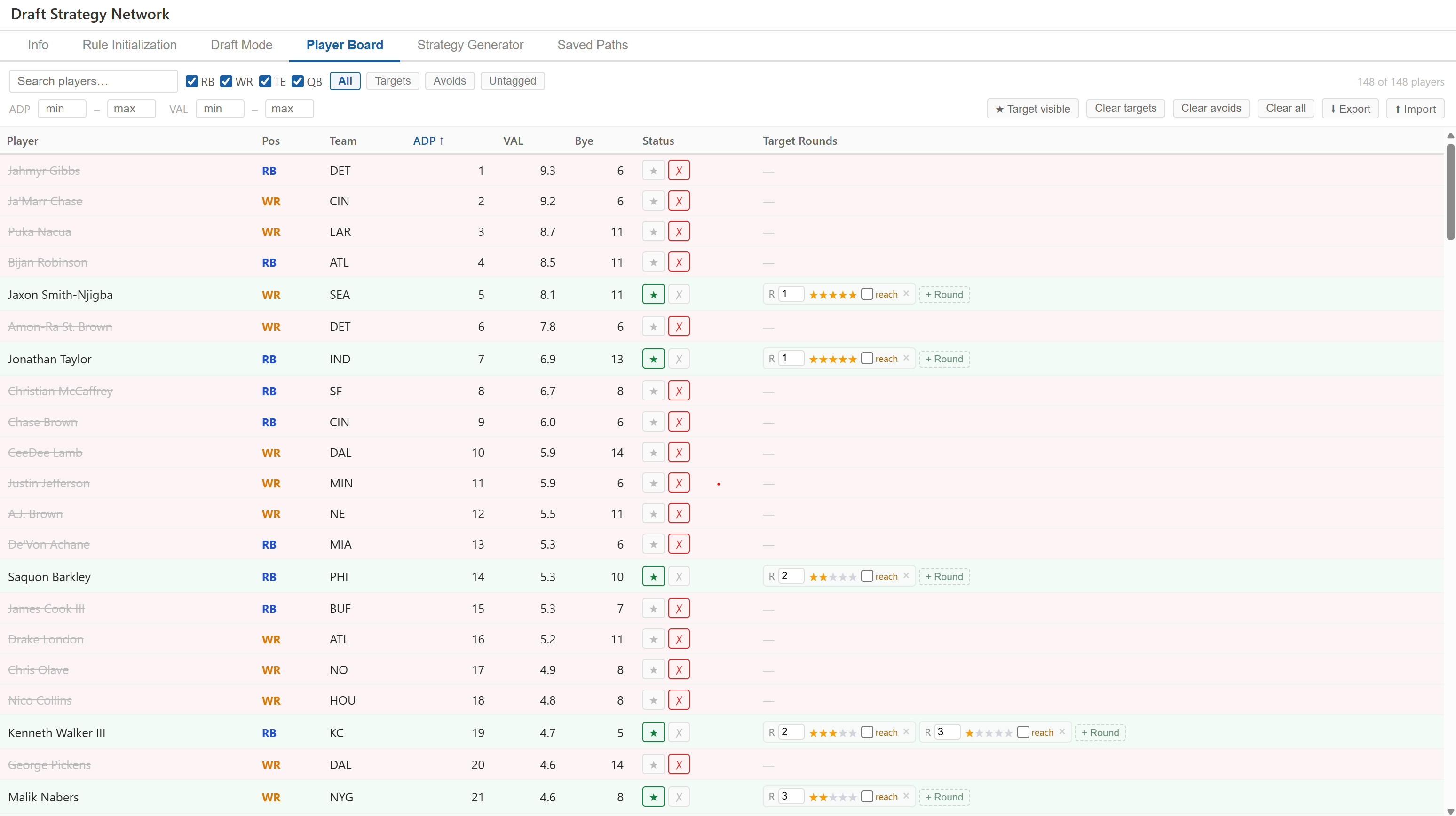
Jaxon Smith-Njigba (WR, ADP 5) and Jonathan Taylor (RB, ADP 7) are both round-1 targets at 5 stars — full confidence. Saquon Barkley (RB, ADP 14) is a round-2 target at only 2 stars — tagged, but not trusted. Kenneth Walker III (RB, ADP 19) carries two Target Rounds entries at once, added with "+ Round": round 2 at 3 stars and round 3 at 1 star — a hedge across two rounds rather than a bet on one. Every player ranked above these by ADP — Gibbs, Chase, Nacua, Bijan Robinson, and more — is marked Avoid: struck through, and removed from every BPA pool and path value calculation. Click to open full-size.
Strategy Generator
A player-focused alternative to Rule Initialization. Where Rule Initialization asks "given these positional rules, what strategies are possible?", the Strategy Generator asks the opposite question: "given the specific players I've targeted and the rounds I'd take them in, what strategies can I actually build?" It builds the same kind of network — same graph, same metrics, same path rankings — but a position is only reachable in a round if at least one of your named targets could plausibly be drafted there, AND every inherited rule that's toggled on is satisfied.
A network built from the targets on the Player Board (min edge confidence set to 20%). The left panel's live summary shows exactly how thin each round's coverage is: round 1 pools to 100% RB / 100% WR — both positions fully covered — while round 3 is 96% RB / 78% WR / 20% TE, and that 20% TE line is thin enough it would vanish outright if the confidence threshold were pushed above it. The top-ranked path (right panel, Path Rankings) projects +29.3 for the sequence WR, RB, WR, RB, WR, WR, RB, TE, QB, WR, and the Projected Lineup panel names the specific player behind each pick — J. Smith-Njigba in round 1 at +8.1 down to W. Robinson in round 10 at +0.4. Click to open full-size.
Inherited Rules — every rule defined in Rule Initialization is listed again here with its own independent on/off toggle, so a rule can constrain one graph without constraining the other. This is what stops the targets-only network from including a path with 2 TEs or 2 QBs just because you happened to tag two of each: turn on the "at most 1 TE" / "at most 1 QB" rules here (on by default) and those paths are pruned out entirely, the same way they would be in Rule Initialization. A rule's label and definition still live in Rule Initialization — deleting it there removes it from both lists.
Pooled confidence — when multiple targets at the same position qualify for the same round, their confidences combine as "at least one is available": 1 − (1−c₁)(1−c₂)⋯. Two 60%-confidence WR targets in round 5 pool to an 84% chance you land a WR there, even though neither alone is a sure thing. This pooled value also sets the edge's thickness on the graph — thin, faint edges mark rounds where your targets are thin.
Include reach-only rounds — off by default. A target round you flagged "reach" only appears in the network (and in the Draft Mode sidebar's target/reach/drop zones) once this is checked. The checkbox appears both here and in the Draft Mode sidebar header — either one flips both, since it's the same underlying setting wherever you're looking at it.
The left panel's summary lists pooled confidence by round and position live, without needing to leave Player Board and back to see the effect of a tagging change — it's driven straight off your tags.
Manual node/edge exclusion, draft-mode loading, and path rankings all work exactly as they do in Rule Initialization — this is a different way to build the same kind of graph, not a separate tool.
Switching to this tab locks Draft Mode's BPA setting to Targets (it unlocks the moment you return to Rule Initialization's graph) — this keeps everything about a given edge, from its hover tooltip to its thickness, reading off the same target data your graph was actually built from.
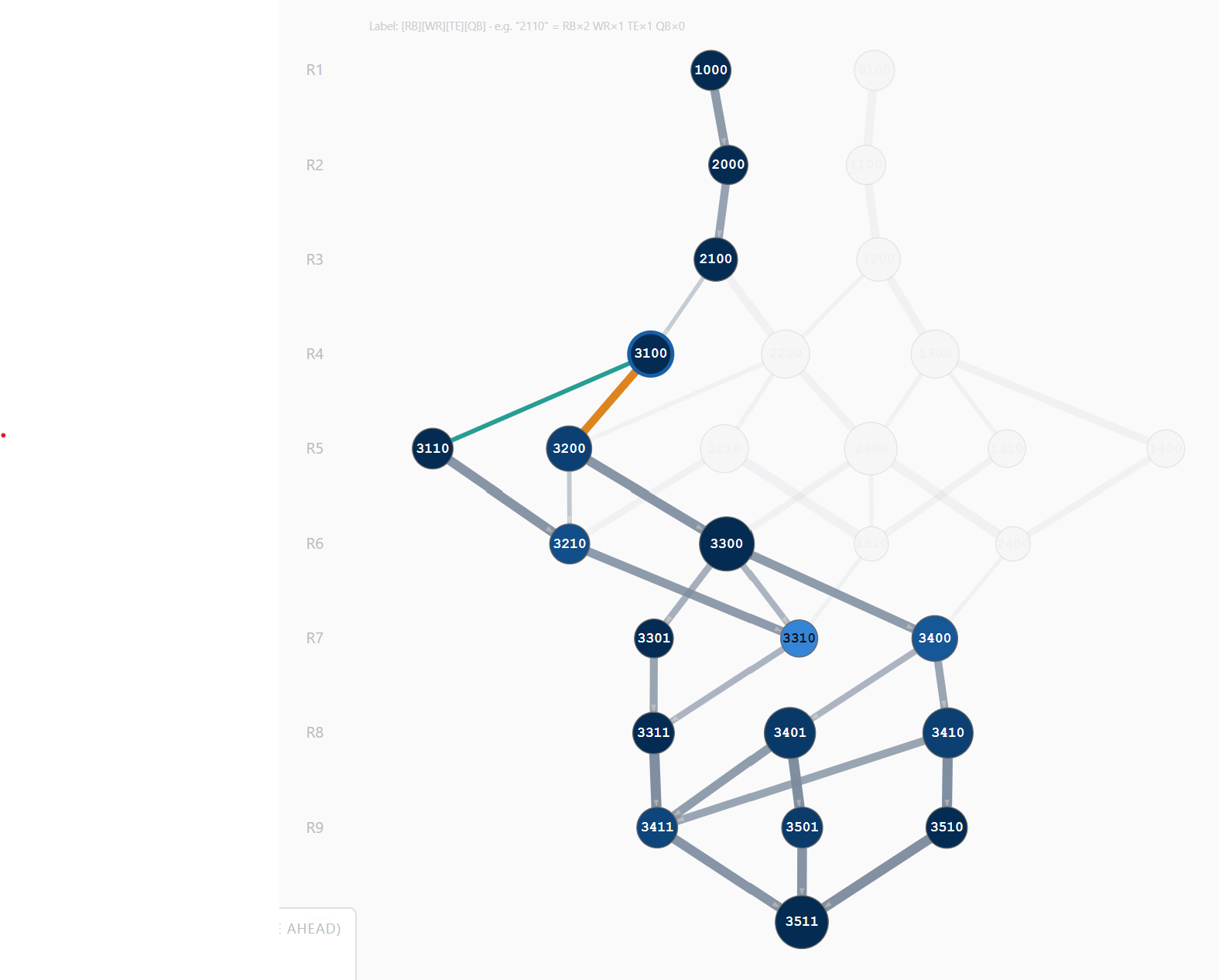
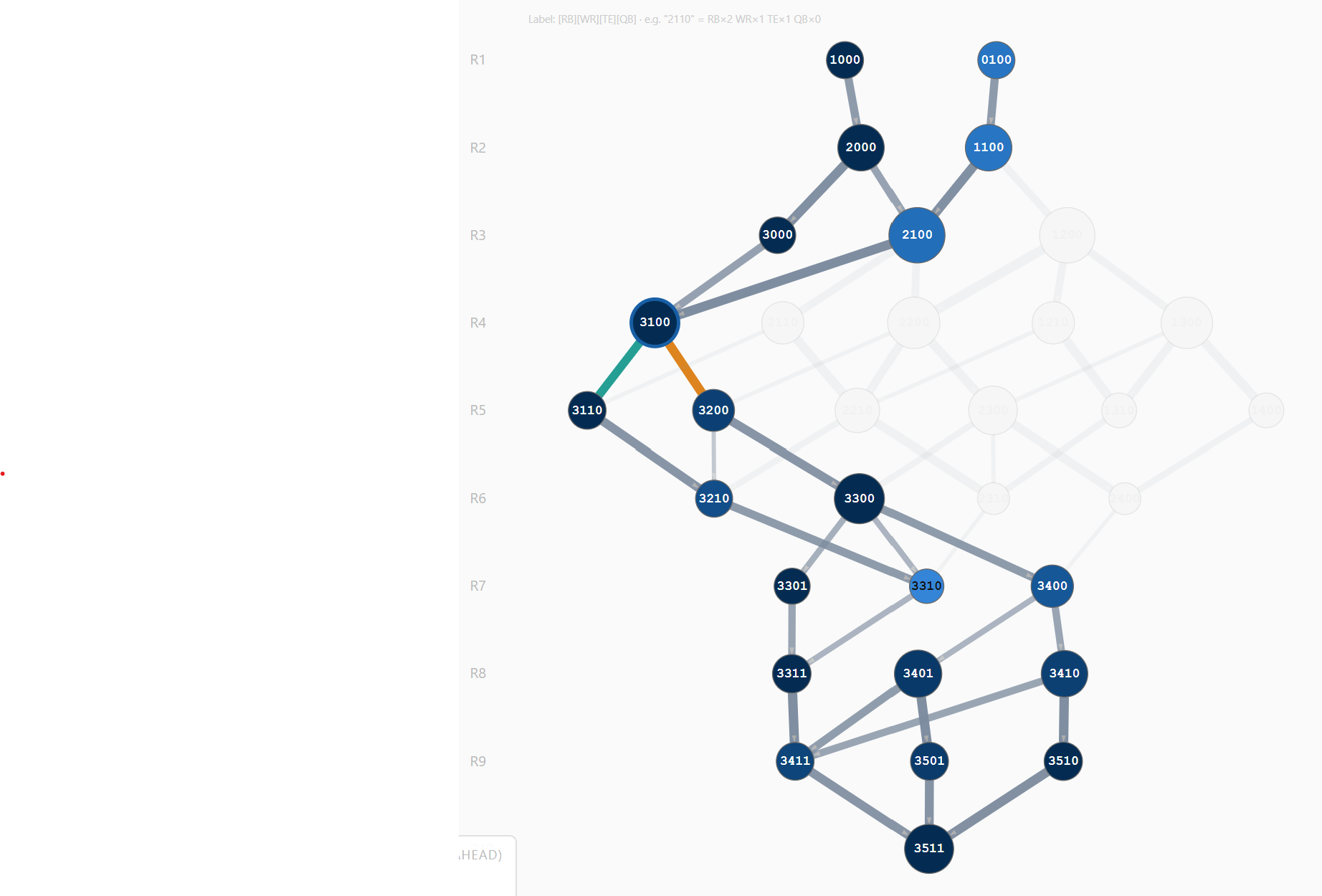
What the reach toggle actually changes: not what a node offers once you're there, but how many ways there are to get there. The two screenshots below select the same node — 3100 (3 RB, 1 WR by round 4) — with everything else identical except that checkbox.
Reaches off (default). Node 3100 has exactly one route in, through 2100. The alternate route through 3000 (three straight RBs) is gone entirely — not dimmed, gone — because the only target that made an RB pick legal that early in round 3 was flagged as a reach, and reach-flagged targets don't count toward the network until you opt in.Reaches on. The same node now has a second way in: 1000 → 2000 → 3000 → 3100 reappears alongside the 2100 route, since the reach-flagged round-3 RB target now counts. Two teal/orange edges leave 3100 either way — that part of the picture, everything downstream, never changes.
Node 3100's downstream half — round 5 on — is identical in both screenshots: a dense, well-branched subgraph running all the way to round 10, plenty of flexibility once you're there. The toggle only changes the approach. That's a distinction Global Flexibility alone can't surface, since it only ever looks forward from a node — a node can score well on everything ahead of it while still being genuinely hard to reach, and "can I get here" is a different question from "what can I do once I'm here." Toggling reaches on doesn't make 3100 a better node; it changes whether the graph is willing to admit there's a second, board-jumping way to reach a node that good.
Tip: switching between the Rule Initialization and Strategy Generator tabs swaps which network is active — whichever one you were last on is what carries into Draft Mode and Saved Paths. Use Rule Initialization to explore broad structural strategies, then switch to the Strategy Generator to pressure-test whether your actual watch list supports one of them.
Saved Paths
Save up to 20 draft strategies. A compact overview list spans the top of the tab, showing every saved draft's pick sequence and total value at a glance, with a checkbox to choose up to 5 of them for in-depth comparison below. Deleting a draft is done from this overview list. Below the overview, the tab is split into two panels covering only the selected drafts:
Left — trend charts and comparison table. Small overlaid line charts plot round number on the x-axis against Value, Pick Confidence, Local Flexibility, Global Flexibility, and Player Pool on the y-axis — one colored line per compared draft, so you can see exactly where in the draft a strategy gains or loses value, where you're relying on shakier target confidence, and where its flexibility or player depth narrows relative to the others. Pick Confidence only appears once at least one saved pick actually resolved to a named target; an untargeted (BPA) pick reads as 0% rather than a gap, since no confidence was ever assigned to it. Below the charts, each compared path is a column in a table organized into three sections:
Header rows — total value (color-coded best to worst across paths), Path Profile (see below), and the pick sequence shown in position colors.
Local Flexibility per round — the out-degree (number of positions available next) at each inner round node. Color-coded by absolute cutoffs: red = 1 (forced pick), yellow = 2, green ≥ 3. First and last rounds are excluded — they are the same for all paths and carry no comparative information.
Global Flexibility per round — the normalized path-count score (0–1) at each inner round node, color-coded relative to other saved paths at the same round.
Summary rows — weakest local, weakest global, avg local, avg global (all computed over inner rounds only), % non-viable picks, and median Δ. All color-coded: green = best, yellow = middle, red = worst across the saved paths.
Each column header shows a colored dot, a visibility checkbox for the network overlay, and an auto-generated strategy label derived from the path's pick sequence. Colors are assigned by comparison slot, so the same 5-color set is reused across different selections. Labels are assigned in priority order:
Zero-RB — no RB taken in rounds 1–3. Bets on WR/TE value early and late-round RB depth. High global flexibility early but often threads the needle at RB in rounds 4–6.
Robust-RB — RB in both rounds 1 and 2, no RB in rounds 3 or 4 (e.g. RB/RB/WR/WR). Front-loads RB security then pivots to other positions. Trades early flexibility for certainty at the position.
Heavy-RB — 3 or more RBs in the first 4 rounds. Maximum commitment to RB depth, sacrificing early picks at WR and TE. Relies on late-round WR value being available.
Hero-RB — RB in exactly one of rounds 1 or 2, with no further RBs taken through round 5. One elite RB early, then a sustained commitment to other positions. Maximum bet on a single stud RB carrying the entire position.
No-WR — no WR taken in rounds 1–3. Usually pairs with heavy RB or early TE. Requires late-round WR depth and a high player-pool count at WR in rounds 4+.
Strong-TE — TE taken in rounds 1–3. Targets an elite TE early (e.g. Bowers, McBride) to secure a positional advantage. Reduces flexibility at the expense of locking in a scarce asset.
Early-QB — QB taken in rounds 1–6. Secures a top-5 QB at a value pick. Structurally uncommon given the default "no QB before round 8" rule; appears when that rule is relaxed.
WR-Heavy — 3 or more WRs in the first 4 rounds. Maximum early investment at WR. Works well at late draft slots where top WRs concentrate; risky if RB depth thins out in rounds 5+.
Balanced — none of the above. Mixed early picks across positions without a dominant pattern. Often reflects paths with moderate flexibility and moderate value across the board.
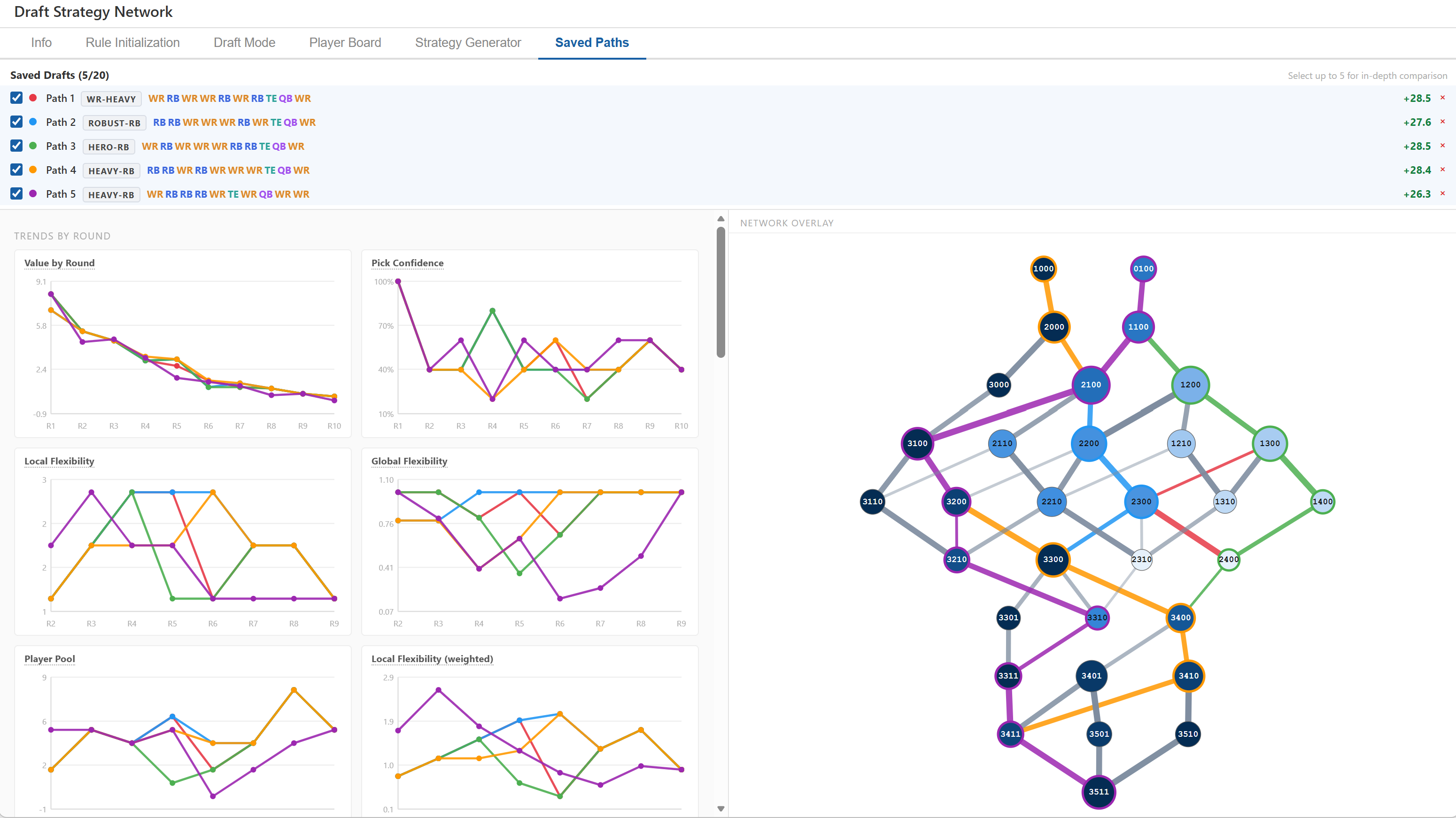
Right — network overlay. The full DAG is rendered identically to the main graph view — same node sizes, same blue color scale, same labels, and (on the Strategy Generator's graph) the same confidence-weighted edge thickness, so a thin background edge here means the same thing it does everywhere else in the tool. Selecting a draft for in-depth comparison overlays it here automatically: that path's edges become thick colored lines (still scaled by their own confidence, not flattened to one width) and its nodes gain a colored stroke ring. Uncheck a path's checkbox in the comparison table header to hide just its overlay without removing it from the comparison. Multiple paths can be overlaid simultaneously to see where strategies diverge and where they share nodes.
Tip: overlaying two paths that share early nodes but diverge in the middle rounds immediately shows you the decision point — the round where the strategies commit to different structures.
Measures explained
Global Flexibility
Number of complete draft strategies still reachable from a node, normalized 0–1 within its own round. Encoded in node color — darker blue = more.
In plain terms: your room to pivot. High (≥ 0.7) means plenty of routes are still open if the board doesn't cooperate. Low (≤ 0.3) means the future is largely scripted — you've narrowed to a small cluster of outcomes and need the board to play along.
If it's low at a round you care about: hover the node to see which edges still leave, and whether you'd actually be happy with the surviving options. If not, relax an upstream rule or exclude the node that's forcing the narrowing and see what reopens.
Local Flexibility
Number of distinct positions legal at your very next pick (out-degree: 1–4). Encoded in node size — always on a fixed scale, so a given value draws the same everywhere (see below). In Saved Paths, colored by absolute cutoff: 1 = red, 2 = yellow, ≥3 = green.
In plain terms: local flex = 1 is a forced round — no structural backup if your target's gone. 3–4 means you can simply take the board's best value, regardless of position.
Hit a forced round? Check its Player Pool first — 3+ viable players makes it a non-issue; 1–2 makes it a real dependency worth targeting explicitly, or worth having a backup plan for.
Path Value / VORP
Sum of VAL (value over replacement) for every pick along a path, using BPA to assign the best available player at each position and round. Higher = better projected roster quality.
In plain terms: the absolute number depends on your CSV; what matters is the gap between paths. A difference of 1–2 points across 10 rounds is marginal — noise in the projections. A gap of 4+ is a meaningful structural advantage worth planning around.
Non-Viable % (NV%)
Percentage of simulated picks where no player passes the BPA filter at that position and round. Estimated over 1,000 scenarios. Lower is better.
In plain terms: below 10% — reliable across most draft environments. 10–25% — the lineup has thin spots; plan to target those positions. Above 25% — the strategy has real holes and depends on specific players falling or competitors passing on them. High NV% often signals that a path threads the needle: it works beautifully when the right players are available, but collapses when they're not.
If NV% is high: (1) widen the BPA range — increasing the ± window models a realistic draft where ADP isn't followed exactly, unlocking more viable picks per round. (2) Add targets in the Player Board for the thin positions — explicit targets are always in the viable pool regardless of ADP. (3) Switch strategies — a high-NV% path is an upside play; have a fallback path saved for when the right players aren't there. (4) Reduce rounds if NV% spikes only in the final rounds — late picks are inherently less predictable and a shorter model is more actionable.
Path Profile
Tallies each of the path's middle rounds into one of four quadrants formed by Local Security and Local Flexibility (weighted) — high/low security crossed with high/low flexibility (80% and 1.0 are the cutoffs). Shown once per saved path, right below Total Value, as a small colored bar plus counts; hover the bar for the specific breakdown.
In plain terms: a single path-wide number here used to be the product of every round's confidence multiplied together — but for a real 8–10 round path that product collapses toward 0% almost no matter what, since it only takes a handful of decent-but-not-great rounds compounding to sink it. That told you risk existed somewhere, not where. The four quadrants instead show what kind of round each one is: Decision point — high security and high flexibility, a real choice rather than just playing the board. Board-dependent — flexible, but leaning on a specific low-security option; you can pivot fine, just don't count on getting your first choice. Locked-in — a likely, feasible pick with no structural backup if it's disrupted. At risk — genuinely low odds on every option, a real chance of getting boxed in.
If a path shows several "At risk" rounds: that's the closest equivalent to old-style "low likelihood," except now you know which specific rounds are driving it — hover the bar to see the count and check those exact rounds in the Local Security / Flexibility table above. (1) Tag more targets at those specific round/position combos to raise their confidence or add real depth. (2) Compare against a path with fewer "At risk" rounds, even at a lower Total Value — the value gap may not survive contact with the actual draft. (3) Accept it as an upside path if you're comfortable treating those rounds as bets rather than plans.
Player Pool
Count of players available in the BPA window (your pick ± the range setting) at each position for the next round from a given node. Shown per round in Saved Paths. Colored by absolute cutoff: ≤2 = red, 3–5 = yellow, ≥6 = green.
In plain terms: a pool of 1–2 means you are relying on a thin slice of the positional market — if one player is gone earlier than expected, your BPA options collapse. A pool of 6+ means you have genuine choice: multiple players at the position fit the value window and you can take best available without worrying about a run depleting your options.
If player pool = 1–2 at a round: (1) Widen the range — adding 2–3 picks to the ± window often captures 2–4 more players at that position, turning a thin pool into a manageable one. (2) Tag more targets in the Player Board — explicit target players always count toward the pool regardless of the ADP window. (3) Pivot the strategy — if the pool is consistently thin at a position for a whole path, that strategy depends on specific players falling to you; consider whether a more flexible alternative path has acceptable value. (4) Exclude the thin node — remove the node that leads to the thin round and see which alternative paths the graph opens up. (5) Accept the risk if you personally have strong conviction on 1–2 specific players being available there — in that case the red cell is by design, not a warning.
Sacrifice
Value lost at each pick relative to the globally optimal path available at that moment. Shown in the draft tracker.
In plain terms: a sacrifice of 0.5–1.0 at a single round is noteworthy — you chose a lower-value pick when a better one existed. Above 1.0 is a significant deviation. Sacrifices compound: three rounds of 0.5 is as costly as one round of 1.5. A path with no single large sacrifice and a low total means you stayed close to optimal throughout without any one pick blowing up the plan.
Median Δ (med Δ)
Median per-pick value delta across 1,000 simulations — the typical outcome relative to the path's projected value. Distinguishes consistent paths from volatile ones.
In plain terms: a negative med Δ means the typical simulated draft came in below the projection — the path is optimistic on average. A positive med Δ means reality tends to beat expectations. Large gaps between med Δ and total value flag a path that looks great on paper but is propped up by one or two ideal picks rarely materializing together.
Flexibility over the course of a draft
A path's weakest link is its lowest local or global flexibility across the middle rounds (first and last excluded) — the single most constrained moment in the strategy, and usually the thing worth checking first. A weakest local flex of 1 is a real forced round: if your target there is gone, there's no structural fallback. 2 is a manageable dependency. 3+ means you can always just take the board's best value. A weakest global flex is a different kind of warning — a bottleneck where many paths funnel through one node, wide before and after it. Local flex is about surviving the very next pick; global flex is about how much of the whole rest of the draft rides on this one round going right.
The two also matter on different timelines. Global flexibility is an early-round concern: a bad round-1 or round-2 pick can quietly eliminate dozens of otherwise-valid strategies before you've even seen how the board is trending, so use it as a tiebreaker between similar-value early options. By round 6+ it's already been shaped by everything before it and stops being actionable. Local flexibility matters the whole way through, just for lower stakes as the draft goes on — a forced round-8 pick still costs you the ability to take best value, but it's a bench-spot problem, not a roster-shape one.
Node size and color, once you've tagged targets
Tag at least one target round anywhere and size switches from raw out-degree to Local Flexibility (weighted), and color switches from path-count to Confidence Ahead (both below) — a node with 3 next-round options stops reading the same whether those options are deep and confident or thin long shots. With nothing tagged, both fall back to the plain structural counts automatically.
Size and color are scaled differently, on purpose. Size is absolute: a given out-degree or weighted-flexibility value always draws the same radius — round 2 or round 8, wide-open graph or heavily pruned one — so sizes are comparable anywhere. Color stays round-relative, read against that round's own peers, since confidence naturally erodes deeper into a draft and a global scale would just paint every late round uniformly pale. Terminal nodes are always a fixed medium size, since out-degree and Confidence Ahead mean nothing with no next pick left to take.
Confidence measures (Saved Paths)
An out-degree of 1 means something very different depending on whether you need one specific player or you're fine with any of six. These four measures, available once you've tagged targets, exist to tell those cases apart:
Local Security — confidence in your single best next-position option. Your floor: how likely you are to get something you actually want at your very next pick.
Local Flexibility (weighted) — a confidence-weighted out-degree: add up every tagged option's own confidence at that round, instead of counting each legal position as a flat 1. Always ≥ Local Security, since it's a sum that includes the max term. This is the measure to answer "can I actually pivot here, or am I locked into one pathway" — a raw out-degree of 3 where two of those positions are backed by near-zero confidence is really an out-degree of ~1 once weighted, and this number says so directly. A value clearing 1.0 means you genuinely have more than one live option; clearing 2.0 means three or more are each pulling real weight.
Confidence Ahead — the same idea stretched over the rest of the draft: at each future round, how confident are your realistic options, weighted by how likely you are to actually land on each one?
Flexibility Ahead — the same forward-looking average, but for branch width instead of confidence: how many real options do the rounds you're likely to actually reach tend to leave you?
Both "Ahead" measures are weighted averages across branches, not best-case — a node with one great option and several weak ones reads as pulled down by the weak ones, not simply "fine." Almost any node has some workable route buried in it; a best-case view wouldn't tell a resilient node from a fragile one that just has a lucky escape hatch.
Read each measure against its pair — Local Security vs. Local Flexibility, Confidence Ahead vs. Flexibility Ahead — not as a lone number; the comparison table shows both halves in one cell (e.g. "80% / 1.6") for exactly this reason. The gap between them is where the real information is:
Small gap (Flexibility close to Security) — one option is carrying the whole round. Solid if it's a high one, but no real backup if it falls through.
Big gap (Flexibility well above Security) — several genuinely live options stacked together. This is real flexibility, not just a high out-degree.
Both low — nothing here is actually likely to pan out, regardless of how open the node looks structurally. A dead end in waiting.
Healthy now, Confidence Ahead drops hard — this round is fine on its own, but it's routing you into a thinner stretch later. Hover forward a few rounds to find which one.
The Trajectory chart (Saved Paths) plots these measures against each other directly instead of by round — one point per compared draft per round, growing larger as the draft progresses so direction is readable without arrows. Watch for a derail: several consecutive points sitting low on both axes, not just one shaky round in isolation. And watch the overall shape: a line hugging the security axis the whole way is secure-but-forced throughout; one tracking up and to the right is genuinely flexible the whole way. Switch either axis to Confidence Ahead / Flexibility Ahead to trace the same idea using the forward-looking versions instead of round-by-round snapshots.
Player pool matters most early-to-middle. A thin pool at round 2–3 threatens the whole roster shape and often forces a reactive pivot; a thin pool at round 7–8 usually just means a weaker bench pick. A red cell isn't equally alarming everywhere — read it relative to when in the draft it happens.
Reading the patterns in the Saved Paths table
Steady green, one red cell — mostly flexible, one forced round. Identify that round and count your BPA options there. If 3+ viable targets remain, it's manageable. If 1–2, that round is your critical dependency.
Global flex drops mid-path — early-round choices funneled you onto a narrow branch. You gave up pivoting ability by committing to a specific roster shape. The network overlay will show this visually as the path converging to a small, dark node.
All-green local but low global — locally you always have immediate choices, but those choices all lead to similar endpoints. Less variety in final rosters than the node sizes suggest. The strategy is flexible pick-to-pick but not strategically diverse.
High NV% at specific rounds — the BPA pool is genuinely thin at those positions given your slot. Either target players there explicitly, widen the range window, or accept that the strategy carries real uncertainty at those picks.
Large gap between total value and med Δ — the path's projected value depends on a chain of best-case picks. Treat it as an upside path rather than an expected-value path.
Good Luck vs. Reaches (Range mode)
When BPA mode is set to Range, the availability window extends on both sides of your pick number:
Good luck −N: players whose ADP was up to N picks before your slot who are still available — they fell further than expected.
+N reaches: players whose ADP is up to N picks after your slot — you are drafting them slightly early.
Wider windows increase the number of viable picks at each edge, boosting path values and reducing NV%. Narrower windows model a draft where ADP is followed precisely. Use Strict or a tight range for floor analysis; use a wider range to model a realistic draft environment where ADP is approximate.
Customizable options and their impact
Draft Slot
Your pick position within each round. In a 12-team snake draft, slot 1 picks 1st and 24th; slot 12 picks 12th and 13th.
Impact: shifts which players are modeled as available at each edge. Early slots access top players first but wait longer between turns; late slots pick late in odd rounds but early in even rounds, creating different value clusters at each position.
League Size
Number of teams. Default 12. Determines the gap between your picks each round (gap ≈ 2 × league size − 1).
Impact: larger leagues tighten availability windows and raise NV%. A 10-team league is more forgiving; a 14-team league compresses the viable player pool at each pick significantly.
Rounds
How many draft rounds to model. Each round adds one row of nodes and edges.
Impact: 10–12 rounds capture the key strategic decisions for most formats. Adding rounds beyond that primarily refines late-round QB and TE strategy, at the cost of a larger graph.
BPA Mode: Strict vs. Range
Strict — available only if ADP ≥ pick number. Conservative, models a draft where consensus is followed exactly.
Range — window extends ±N picks. More realistic; most drafts deviate from consensus.
Impact: Range mode produces higher path values and lower NV%. Use Strict for worst-case floor analysis.
Good Luck / Reaches (Range inputs)
Default: −3 / +8.
Good luck (−N): captures "surprise falls." Rarely needs to exceed 5. A value of 0 means you only count on players to be there if they're already past their ADP.
Reaches (+N): models willingness to draft early. A +8 reach means taking someone up to 8 picks before their consensus ADP. Lower values are more disciplined; higher values are appropriate if you're targeting specific players aggressively.
Rules
Rules prune the graph by removing roster states that violate constraints. Default rules encode common strategy:
"No QB before round 8" — enforces the late-QB approach.
"At most 1 TE" — prevents double-TE builds.
"At least 3 RB by round 7" — enforces RB depth.
Impact: more restrictive rules shrink the graph and eliminate strategies. Relaxing rules (e.g., removing the QB cap) opens new paths — useful for exploring stud-QB or zero-RB approaches.
Take [pos] in round R and No [pos] in round R are a different kind of rule from the other four: instead of constraining which roster states are legal in general, they pin a specific position to (or out of) one exact round, rather than every round up to it. "Take RB in round 2" makes round 2 RB-only, full stop, for every path in the graph — the tool for locking in a plan you've already committed to (e.g., "I know I'm taking a TE in round 3 regardless") so every other measure reflects that commitment rather than treating it as just one option among several. "No WR in round 4" is the mirror image — it removes just that one position from just that one round, leaving every other round's WR availability untouched, unlike "No WR before round 4" (which blocks WR everywhere from round 1 through 3). Use the exclusion form when a specific round is a known dead end for a position (a run you're certain will happen, a bye-week conflict, a position you've ruled out at that exact pick) without touching how that position behaves anywhere else in the draft. Both have an independent Strategy Generator toggle, and stack with everything else — including with each other and themselves, so a handful of these rules can lock in or rule out an exact sequence of picks.
Node Exclusion
Select a node and click "Exclude node" to manually remove it. Cascade pruning removes any nodes that become unreachable or dead-ended as a result.
Impact: useful when a roster construction is technically rule-legal but practically useless given your actual draft board. Manual exclusions stack on top of rules and persist across tab switches.
Min Edge Confidence
Default 0% (off). Every edge already carries a pooled target confidence for its (round, position) — the same number shown on hover and used for edge thickness. Raising this threshold removes any edge below it, exactly like manually excluding that edge, cascade included: a node only reachable through a pruned edge disappears too.
Impact: a quick way to ask "what does my plan look like if I only trust my higher-confidence targets?" without hand-picking which edges to exclude. Set it to 75% and the graph collapses to only the routes backed by real conviction — often a much smaller, more forced-looking network than the full one, which is itself useful information: a large gap between the full graph and the 75%-confidence graph means a lot of your plan currently rests on shaky targets. Works on whichever graph is active (Rule Initialization or the Strategy Generator) and stacks on top of rules and manual exclusions. Since it reads the same pooled confidence Rule Initialization always computes, it's usable there too, not just on the Strategy Generator's network — though it only has real effect once you've tagged some targets, since an untagged edge's confidence is 0.
Target / Avoid Tags (Player Board)
Targets boost path scoring for sequences that can acquire those players; avoids remove players from all BPA pools, tightening positional scarcity and raising NV% at those positions.
Impact: avoiding a top-5 RB shifts path rankings — any path relying on that player as BPA fallback loses value. Targets surface first in the draft sidebar and are prioritized in lineup projections.
Use-case examples
Example 1: Is my zero-RB plan structurally sound?
Setup: draft slot 10, league size 12, 10 rounds. Add a rule: "RB: at most 1 by round 3." Observe the resulting graph.
What to look for: the rule collapses RB-heavy early nodes. If the surviving WR-first paths show high global flexibility (dark blue nodes, scores above 0.6) and competitive path values, the strategy is structurally sound — you have many complete routes to a good roster. If those paths are small and light-colored, the constraint has boxed you into a narrow corridor: the graph is telling you that zero-RB leaves you with very few ways to finish the draft legally.
If those paths have elevated NV% at RB in rounds 4–6, the strategy is threading the needle at those picks — it requires specific late-round RBs to be available. Ask yourself: how many late RBs do I genuinely trust? If the answer is 3+, the plan is viable. If it's 1–2, you're making a bet on a specific player still being there, not a strategic plan.
Example 2: Should I reach for TE now or wait?
Setup: in Draft Mode, you have taken RB–WR through round 2. A TE you want is on the board in round 3, but consensus says he'll be there in round 4.
What to look for: in the "By Next Pick" panel, compare the TE row against the RB and WR alternatives. Look at two things simultaneously: path value and global flexibility. If the TE path's value is within 1–2 points of the best alternative but its global flex is noticeably lower — smaller nodes, lighter color — the reach is costing you optionality without paying for it in value. You're giving up the ability to pivot later in exchange for certainty now, and the value doesn't compensate.
If global flex is similar across alternatives, the decision comes down to value alone, and the reach may well be justified. Save both the TE path and your best non-TE path to the Saved Paths tab and check the sequence table: at what round does the TE path become forced (red local flex cell)? That's the round where you'll regret the reach most if your remaining targets aren't available.
Example 3: Comparing two complete strategies side by side
Setup: before the draft, save the top path from two different approaches — say, a robust RB build (3 RBs in first 5 rounds) and a zero-RB build. Switch to the Saved Paths tab.
What to look for: first, scan the Local Flexibility rows for red cells. Any red cell is a forced round — a pick where only one position is legal and you have no fallback. A strategy with multiple red cells in different rounds is relying on several specific picks all going to plan, compounding the risk. A strategy with all-green local flex rows can absorb surprises at any individual round without breaking the plan.
Next, compare global flex round by round. Look for a round where one path drops sharply relative to the other — that's its bottleneck, the round where the strategy's future options collapse to a narrow set. A path that has high global flex through round 4 and then drops in round 5 is telling you: "I'm flexible early, but by round 5 I'm committed to a specific trajectory, like it or not."
Finally, toggle both paths in the network overlay. The shared nodes (where both colored lines pass through the same circle) are the parts of the draft where the two strategies agree. The first point of divergence — the round where the lines branch apart — is where the actual strategic difference kicks in. Everything before that point is the same plan; everything after is where you're choosing one future over the other.
Tip: a path with lower total value but higher global flex and no red cells is often the safer choice for a competitive draft. The value gap may close once the draft plays out; the optionality gap usually does not.
Example 4: Spotting a critical dependency before draft day
Setup: you're reviewing the default saved paths and notice the "Value" path has a red cell in round 5 (local flex = 1). The "Flex" path has all-green cells.
What to look for: click into draft mode and navigate to the round-5 node on the Value path. Check the "By Next Pick" panel for that round — specifically, how many viable players are projected at the forced position. If 3+ targets are listed, the forced pick is not dangerous; multiple players can satisfy it. If only 1–2 appear, you have a critical dependency: one specific player (or a very thin position group) is load-bearing for the whole strategy.
This is the practical meaning of "threading the needle." The Value path might project 4 more total value than the Flex path — but if it requires Rounds 5 AND 7 to both hit specific, thin positions, the expected value shrinks significantly once you account for the scenarios where they don't. The NV% statistic in the Saved Paths table should confirm this: if NV% is elevated on the Value path, the projection is optimistic.
Example 5: Tracking sacrifice during a live draft
Setup: in Draft Mode after 4–5 picks, check the Draft Tracker panel before each pick.
What to look for: the sacrifice number at each round tells you the value cost of the pick you made relative to the best available alternative at that moment. A sacrifice of 0 means you happened to take the highest-value path available — no cost. A sacrifice of 1.0+ means a meaningful gap opened up: either you reached for a player, or the position you took had a weaker BPA pool than the alternatives.
What matters most is the pattern, not any single number. A draft with one large sacrifice (e.g., 1.5 in round 2) but zero sacrifice thereafter means you made one aggressive choice and then executed cleanly. A draft with small sacrifices of 0.3–0.5 every single round means you're consistently drifting from the optimal path — the total sacrifice compounds to something significant even if no individual pick looked costly.
At any point, hit Save to snapshot the full projection. Saving mid-draft captures your actual picks plus the projected best remaining picks — so you can open Saved Paths and compare your live trajectory against your pre-draft plan to see where the real draft has diverged from the ideal one.
Example 6: How does my draft slot change the optimal strategy?
Setup: set draft slot to 1. Note which paths rank highest and what their early-round picks look like. Then change the slot to 6, then to 12. Re-examine after each change.
What to look for: at slot 1, you pick first and then wait 23 picks until round 2. The top WR and RB tiers are all available in round 1 — almost no penalty for going RB or WR, so the graph is wide at the top. At slot 12, you pick 12th and 13th back-to-back, which creates a different value window: the snake turn compresses your wait time, making back-to-back RB/WR or WR/RB pairs highly efficient. Look for which strategy labels dominate at each slot. At middle slots (6–8), the graph is often most balanced — neither the early-slot abundance nor the late-slot back-to-back concentration applies.
If you play in multiple leagues with different draft positions, run this analysis for each slot and compare. The structure of the graph itself doesn't change — only the edge values and player-pool counts change — so the same graph with different settings tells you whether your preferred strategy is slot-dependent or universally sound.
Example 7: A positional run wipes out your targets
Setup: in Draft Mode, you've taken WR–WR in rounds 1–2. In rounds 3–5, six other managers draft RBs in a row. You're now at round 6 with less RB depth than planned.
What to look for: check the Player Pool cells in the Saved Paths table (or hover over the round-6 node in Draft Mode). If the pool count at RB is red (≤ 2), the run has genuinely thinned the viable options — the BPA window no longer covers the players you wanted. If the pool count is still green (6+), the run was concentrated at a tier above your pick and your targets are still in range.
The graph itself doesn't automatically model other managers' picks — that's an ADP-based estimate. Use the "Avoid" tag to manually remove specific RBs you know are gone (if you're running a mock). This collapses the BPA pool exactly as if those players were drafted, and re-running the comparison shows you what the board actually looks like after the run. The strategy with the best player-pool count at the affected position round is your most resilient option given the new information.
Example 8: Stress-testing your preferred strategy
Setup: you have a preferred plan — say, Hero-RB. Before draft day, run two sessions in Draft Mode. First, execute it optimally (always take the highest-value path). Second, execute the worst-case version: at each forced pick, imagine the top BPA target is gone and you take a lower-tier player. Save both outcomes to Saved Paths.
What to look for: compare the total values and NV% of the optimal and worst-case paths. If the worst-case Hero-RB still outscores the optimal Robust-RB, the strategy is robust — its floor is better than the alternative's ceiling. If the worst-case version is bad, the strategy is execution-dependent: it works when your targets are available, but breaks badly when they're not. This is exactly the information you need to decide whether to commit or hedge with a backup plan.
A secondary check: look at which rounds produce the largest sacrifice in the worst-case run. Those are the rounds where player availability matters most to your strategy. If rounds 4 and 6 always produce high sacrifice in bad scenarios, those are your critical picks — the ones where you should have the deepest target list and the most willingness to pivot position if needed.
Example 9: A full five-strategy comparison — reading the saved paths table
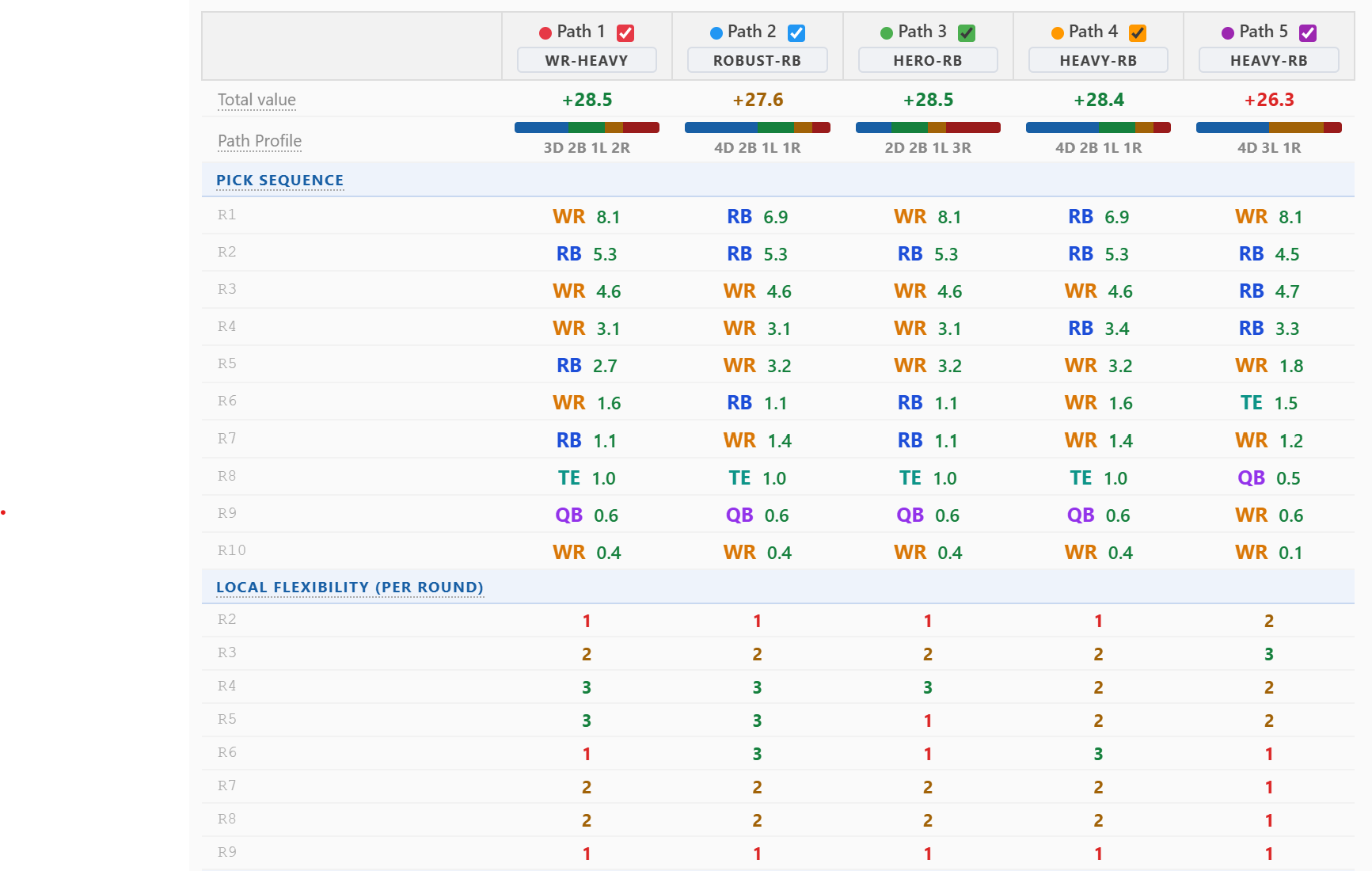
Setup: five real saved paths, deliberately chosen to span different flexibility/security profiles rather than to all look the same. WR-Heavy and Hero-RB tie for the top projection at +28.5; Heavy-RB (Path 4) sits close behind at +28.4; Robust-RB projects +27.6; the second Heavy-RB path (Path 5) trails the group at +26.3. Four of the five cluster inside a single point of each other — the real question isn't which number is biggest, it's which of these near-equal projections is actually the one you can count on.
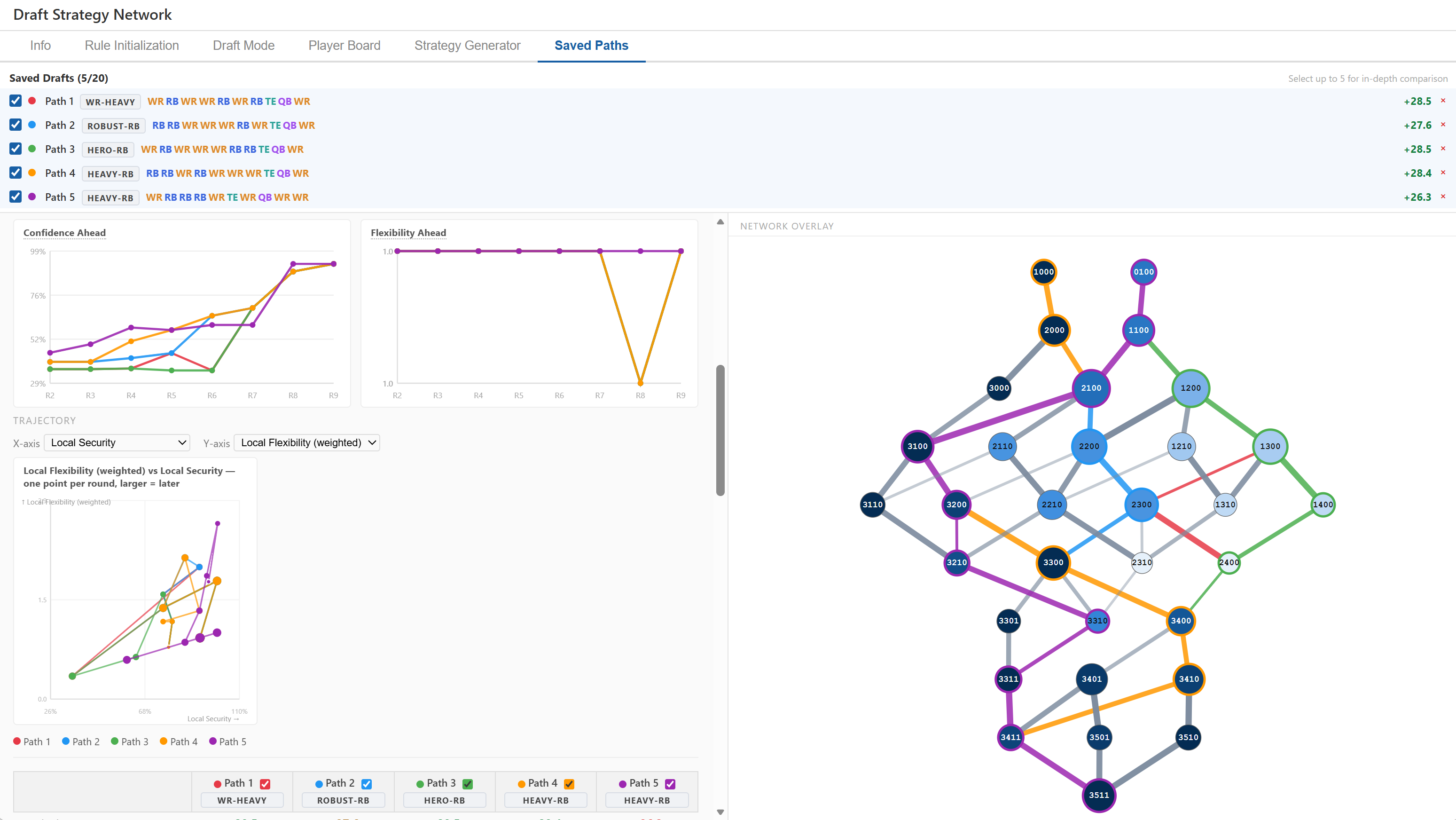
All five saved drafts selected for in-depth comparison. The six trend charts on the left (Value, Pick Confidence, Local Flexibility, Global Flexibility, Player Pool, Local Flexibility weighted) plot every path's round-by-round shape at once; the network overlay on the right shows all five routes traced over the same graph. Click to open full-size.
Path Profile: the tied-best path isn't the sturdiest one. Hero-RB (green, +28.5) ties for the highest projection in the set — but its Path Profile reads 2D 2B 1L 3R: three "At risk" rounds, more than any other path here. WR-Heavy (red, also +28.5) gets the identical value with a meaningfully better profile, 3D 2B 1L 2R — one more Decision point, one fewer At-risk round, for the same projected ceiling. Path 5 (purple, Heavy-RB) sits at the other extreme: the lowest total value in the group at +26.3, but the best-looking tally on paper, 4D 3L 1R — four Decision points and only one At-risk round. Value and Path Profile are answering different questions, and this set makes the gap between them concrete: the number you'd pick by projection alone (Hero-RB) is not the number you'd pick by risk profile alone (Path 5).
Total value, Path Profile, the full pick sequence with each round's projected value, and raw Local Flexibility per round, side by side for all five paths. Click to open full-size.
Same tally, different severity. Robust-RB (Path 2) and Heavy-RB (Path 4) post the identical Path Profile — 4D 2B 1L 1R — despite different pick sequences and a 0.8-point value gap (+27.6 vs +28.4). The quadrant tally alone makes them look equally sturdy. The round-by-round Global Flexibility numbers say otherwise: Path 2's weakest round bottoms out at 0.78, while Path 4's drops to 0.40 — half as connected at its tightest point. Both "Locked-in" rounds clear Path Profile's 80%-security cutoff, so both get bucketed the same way, but one clears it by a lot and the other barely. Path Profile is a fast triage tool, not the final word — when two paths tie on the tally, the continuous per-round tables underneath are the tie-breaker.
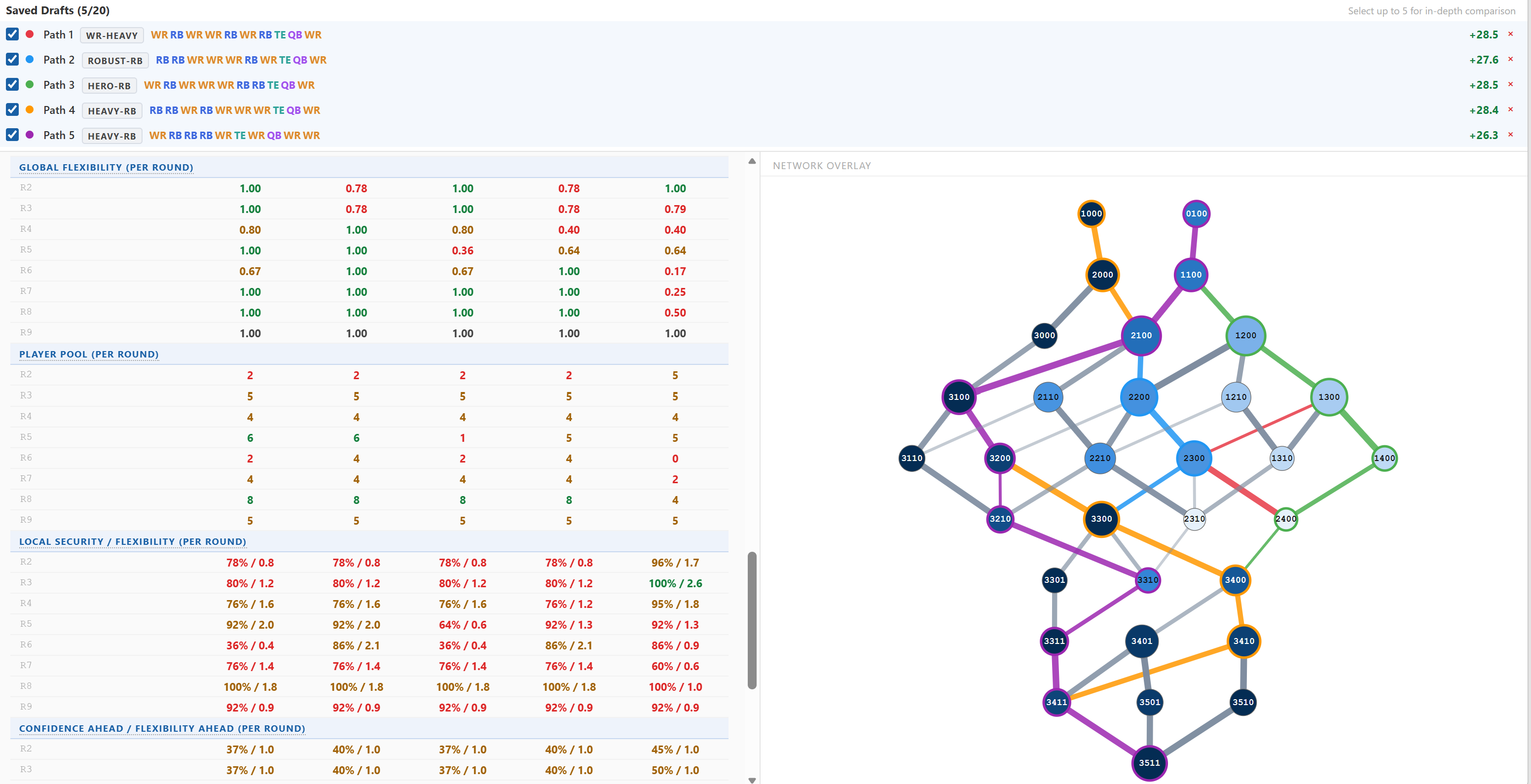
Convergence: these five strategies end up in the same place. Reading the pick sequences round by round turns up something the labels hide completely: WR-Heavy, Hero-RB, and Path 5 all open WR (node 0100); Robust-RB and Heavy-RB both open RB (node 1000) — an even split. By round 3, three of the five (Robust-RB, Heavy-RB, and Path 5) have already converged on node 2100, while WR-Heavy and Hero-RB share 1200. Heavy-RB and Path 5 then share both node 3100 at round 4 and node 3200 at round 5, before finally splitting at round 6. By round 7, four of the five paths — every one except Path 5 — sit at the identical node 3400. And by round 9, all five converge on node 3411 and finish at the exact same terminal roster, 3511 (3 RB, 5 WR, 1 TE, 1 QB), regardless of which strategy label they started under. Five differently-named strategies is really a handful of early forks layered on top of one shared destination — the labels describe the route, not the roster you end up with.
Global Flexibility, Player Pool, and Local Security / Flexibility per round for all five paths. Click to open full-size.
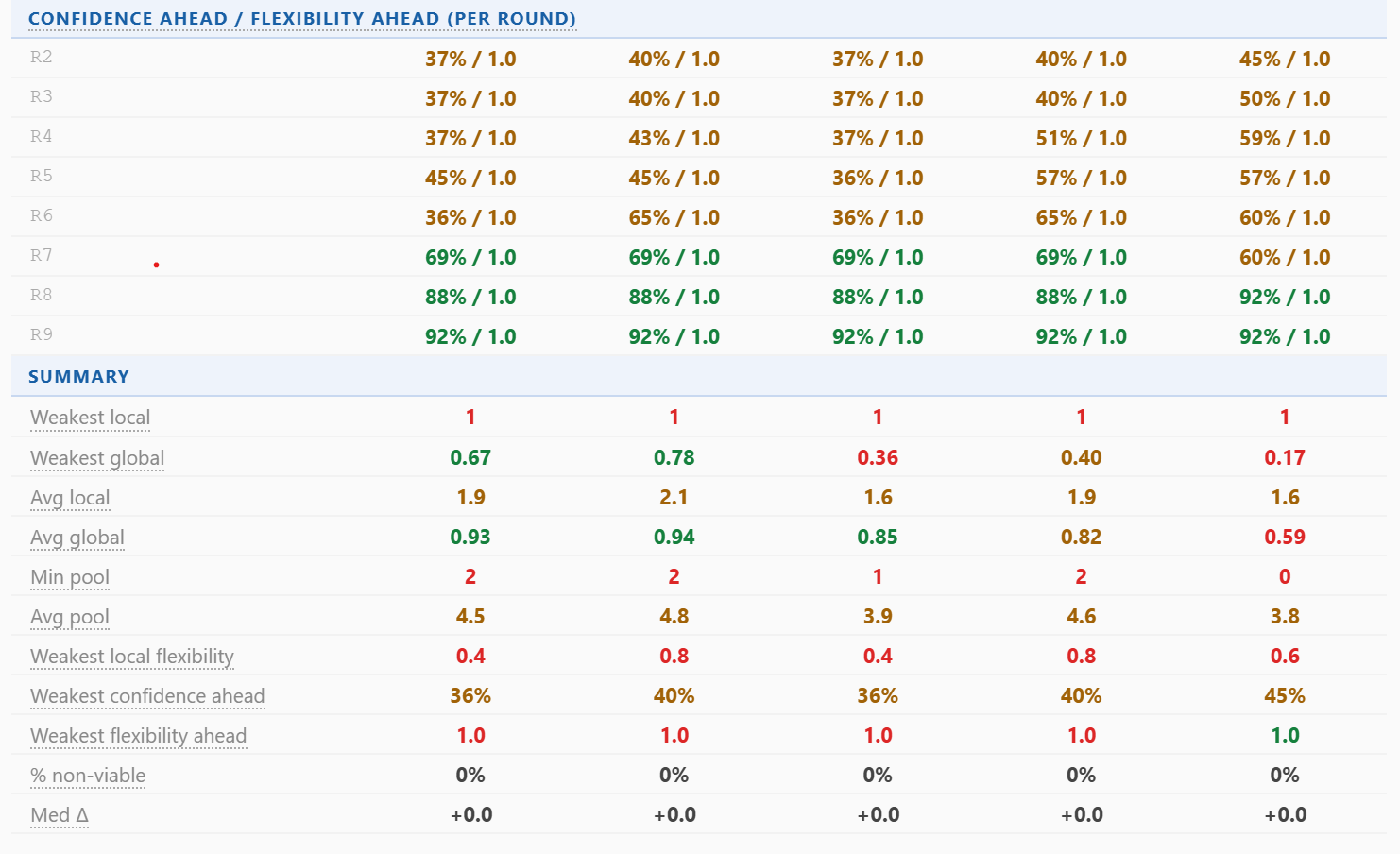
Path 5's round 6 is where the projection actually breaks down. Every other path holds Global Flexibility at 0.64 or above through round 6; Path 5 collapses to 0.17 — the single lowest number anywhere in this comparison. The Player Pool row for that same round confirms it isn't a modeling quirk: Path 5's pool reads 0 — the BPA window is completely empty at that exact round, on that exact path. This is what a real bottleneck looks like in the data, not just in theory: a path can carry a strong early Local Security/Flexibility read (Path 5 posts 100% / 2.6 at round 3, the best single number anywhere in the table) and still run into a round with no structural way through.
Confidence Ahead and Flexibility Ahead by round, and the trajectory chart (Local Flexibility weighted vs. Local Security, one point per round, growing larger with round number). Click to open full-size.
The Flexibility Ahead chart makes a second, smaller version of the same story visible: every path holds flat near 1.0 across every round except Heavy-RB (orange), which dives sharply at round 8 before recovering — a real forced-branching moment far enough downstream that it barely dents the path's Local Flexibility average, but shows up clearly the moment you look forward instead of only at the round itself. The trajectory scatter tells the shape story at a glance: most paths climb up and to the right as the draft progresses (more secure, more flexible, later), while a line that dips back toward the origin mid-draft is exactly the "derail" pattern worth tracing back to its round in the table above it.
The Summary section that closes the comparison table — weakest and average local/global flexibility, player pool, and confidence measures, one column per path. Path 5's weakest global (0.17) and min pool (0) stand out as the clear outliers in the whole set. Click to open full-size.
A decision-making walkthrough. With five near-tied projections and one clear laggard, a useful sequence:
Treat Path 5 as a contingency, not the plan. It has both the lowest total value (+26.3) and the concrete round-6 bottleneck (0.17 global flex, 0 player pool) — the two signals agree for once. Keep it saved for the scenario where the board specifically favors it, but it isn't the pre-draft default.
Treat Hero-RB as the upside bet, not the safe pick. It ties for the best projection, but its 3-round "At risk" tally is the worst in the set — that value is real only if all three of those rounds break your way.
Prefer WR-Heavy over Hero-RB. Same +28.5 ceiling, a sturdier Path Profile (3D 2B 1L 2R vs. 2D 2B 1L 3R) — there's no value cost to taking the safer route to the identical number.
Between Robust-RB and Heavy-RB, prefer Heavy-RB. It projects 0.8 points higher for the same Path Profile tally — the one place the tally understates the gap (0.78 vs. 0.40 weakest global) is worth knowing, but it doesn't flip the comparison; Heavy-RB is still the better-paying route to a similarly-shaped risk.
At the draft, ride the convergence. Since four of five paths share node 3400 by round 7 and all five share 3411 by round 9, the early rounds are where the real decision lives — round 1 (WR vs. RB first) and round 3 (whether you're already at 2100). Once you're on the shared trunk, you have longer than it looks to let the board decide which label ends up describing what you did.
The structural takeaway. Five saved paths, five different labels, one shared terminal roster — the differentiation here is entirely in the route and its risk, not the destination. Total value clusters four of five within a point of each other; Path Profile and the round-by-round tables are what actually separate a path worth committing to from one worth keeping in reserve. Read them together: the tally for a fast read, the per-round numbers for the tie-break, and the trajectory chart for the shape of the whole draft at a glance.
Example 10: Walking Hero-RB node by node — why Example 9's riskiest Path Profile looks that way
Setup: Example 9 flagged Hero-RB (Path 3, WR RB WR WR WR RB RB TE QB WR) as a specific kind of trap — it ties for the best projected value in the set (+28.5) but posts the worst Path Profile of the five, 2D 2B 1L 3R: three "At risk" rounds, more than any other saved path in that comparison. This example walks the same real path round by round to show exactly where those three rounds are and how you'd have seen at least one of them coming before it arrived.
Round 2 — At risk (78% / 0.8). Both numbers sit just under the quadrant thresholds (80% security, 1.0 flexibility) — not a disaster, but not a round with real structural backing either.
Round 3 — Decision point locally (80% / 1.2), but Confidence Ahead is only 37%. This is the round to slow down on. Read only its own row, round 3 looks like the best kind of node — security and flexibility both clear the bar. But Confidence Ahead — the confidence-weighted look at the rest of the draft — is 37%, less than half the local number. The path's own future rounds are already dragging the forward-looking measure down, even though nothing about round 3 itself shows it.
Round 5 — At risk (64% / 0.6), and Round 6 — At risk (36% / 0.4), the low point of the whole path. This is what round 3's low Confidence Ahead was foreshadowing. By round 6, local security has fallen to 36% — the single worst number anywhere on this path — with flexibility to match. Whatever round 3 felt like, the path was already headed here.
Round 7 on — recovery. Confidence Ahead climbs back — 69% at round 7, 88% at round 8, 92% at round 9 — as the thin rounds fall behind and the path closes on its terminal roster. Round 9 itself lands as Locked-in (92% / 0.9): secure, but no real alternative if it doesn't hold.
Putting it together. Reading Local Security/Flexibility alone, round by round, makes rounds 5 and 6 look like a bad stretch that starts at round 5. Confidence Ahead at round 3 is what tells you it was foreseeable two rounds earlier — the recursion at round 3 is already averaging in what round 3's own number can't see. That's the practical use of the "Ahead" measures: they don't predict a different outcome, they just let you notice the soft stretch from further away, while there's still an earlier round left to react in — tag more depth at whichever position is thin around round 5–6, or go in accepting that stretch as the point in this plan most likely to need an improvised pivot. It's also the concrete mechanism behind Example 9's Path Profile tally: three separate rounds (2, 5, 6) each independently landed in the "At risk" quadrant, and the tally is simply what you get when you count them.
Tip: when a path has a stretch of "At risk" rounds buried in it, Confidence Ahead shows the drop at every round upstream of the stretch, not just within it — round 3 read 37% here, a full round before the numbers themselves turned bad. If Confidence Ahead is falling while a round's own Local Security still looks fine, that gap is the tell: work forward from that round to find which specific later round is dragging it down, the same way round 3 here pointed straight at round 6.
Questions to ask yourself
The tool surfaces structure, flexibility, and value — but the decisions are yours. These questions are designed to connect the numbers to the judgment calls that actually matter on draft day.
Before the draft — planning your strategy
Where is my forced round? Every strategy has at least one round where local flex = 1. Which round is it, and how many viable players do I have there? If fewer than 3, that round is my single biggest risk.
Am I planning around structure or around a specific player? A structural plan (e.g., "take the best available RB in round 4") survives surprises. A player-specific plan ("I need Breece Hall in round 3") fails if that player goes one pick earlier. High NV% and thin player pools are signs you're betting on a name, not a structure.
What rule change would open up the most new paths — and would I actually be comfortable with those paths? Try removing or relaxing one rule and observing the graph change. Sometimes a mild adjustment unlocks a whole class of strategies you hadn't considered. Other times, the new paths are ones you'd never want.
If I had to pivot completely at round 4, which alternative path still recovers the most value? In Draft Mode, take your preferred path through round 3 and then check the "By Next Pick" panel. The best alternative-position path visible there is your real fallback — not an abstract one, but the specific alternative the graph says is available from your exact situation.
Does my preferred strategy work equally well at my actual draft slot? Check the path rankings at your exact slot and league size. A strategy that dominates at slot 6 may be mediocre at slot 1 or 12 if the player pool looks different at those pick numbers.
Would I be happy with the worst-case version of this plan? Strip away the best-case BPA assumptions. If every target at every thin round is gone and you're left with fallback options, is the resulting roster still competitive? If not, the plan has a bad floor.
When comparing two strategies
At which round do the two paths first diverge? Everything before that point is the same plan. Focus your comparison on what happens after the split — what are you actually choosing between?
Is the value difference between paths within noise range? A gap of 1–2 points over 10 rounds is marginal. If the paths are within noise, the decision should come down to which one has lower NV%, fewer red cells, and a deeper player pool at forced rounds — not a marginal value edge that could easily reverse with updated rankings.
Which path has more red local-flex cells, and are those forced rounds at positions I'm confident covering? A path with 2 red cells in positions where I have 5 targets each is less risky than a path with 1 red cell in a position where I have 1 target.
If I swap one round between the two paths, how much of the value difference is from that pick vs. downstream effects? In Draft Mode, take Path A's picks through round R-1 and then make Path B's round-R pick. The path rankings will show you what the subsequent structure looks like — is the value difference front-loaded in one pick or distributed across the rest of the draft?
Where on the overlay do the two paths share nodes? Shared nodes mean shared fates — the strategies agree there. The round where the colored lines first split apart is the actual decision. Is that a round where you feel confident making a real-time call, or one where you'd prefer to have a preset plan?
Which strategy survives a bad round better? Save the optimal version of each strategy. Then in the Player Pool rows, find the round where each path has its weakest pool. If Path A's worst pool is R5 (3 players) and Path B's worst pool is R7 (2 players), Path A has a better floor at its critical round.
During a live draft
Am I still on the strategy I planned, or have my picks quietly committed me to something different? Check the strategy label on your current path in the path rankings. If it reads "Hero-RB" and you started as "Robust-RB," understand what changed and whether you're comfortable with the emergent plan.
How many high-flex rounds do I have remaining? High local flex (≥ 3) means the next pick can be any position — real optionality. If you have 3+ such rounds ahead, you can absorb surprises. If you have only 1, you're in execution mode: the structure is set and you're filling specific slots.
Is my sacrifice elevated because I made a bad choice, or because the board forced it? A high sacrifice on a round where all positions had thin BPA pools is not the same as a high sacrifice on a round where a great alternative existed. The draft tracker shows the number; your judgment fills in the context.
A run just happened on my target position. How many paths in my subgraph still reach the depth I need there? In Draft Mode after each pick, look at the surviving paths in the Top 5 panel. If paths requiring 2+ more of that position have mostly disappeared, the run has genuinely constrained you. If they're still present with green player-pool counts, the run happened above your value window and you're fine.
Is the player in front of me a value pick or a reach, and how does that change my downstream structure? Taking a player 5+ picks before their ADP changes which paths remain optimal. Before picking, check what the path rankings look like if you take that player — save the "reach" path and the "wait" path, then compare global flex and NV% to make the call.
Note on player data: path values depend on the rankings CSV loaded in the Player Board. Re-import updated rankings after injury news or ADP shifts; target and avoid tags persist across re-imports.